Security vs Privacy
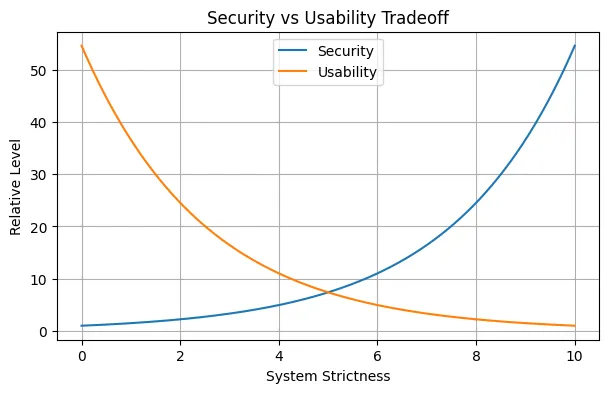
With most online platforms forcing users to enable 2FA, it’s time to question the trade-offs between Security and Usability. I’d like to put it this way, The easier it is for you to login, the easier it is for a potential intruder to do the same. The more difficult you make the workflow for yourself, the harder it is for a intruder.
More friction in the login phase doesn’t necessarily mean you’re protected, let’s have a look at 2FA methods.
Common 2FA Methods
| Method | How it works | Security | Usability | Notes |
|---|---|---|---|---|
| A login code or link is sent to your email inbox. | Low | High | Only as secure as your email account. | |
| SMS | A one-time code is sent by text message. | Low | High | Vulnerable to SIM swapping and interception. |
| Authenticator app (TOTP) | Generates time-based codes on your device. | High | Medium | Works offline; common choice for most accounts. |
| Authenticator app (HOTP) | Generates counter-based codes on your device. | High | Medium | Less common than TOTP; requires resync if counters drift. |
| Push notifications | You approve or deny a login prompt on a trusted device. | Medium | High | Convenient, but can be exposed to prompt fatigue attacks. |
| Security keys (FIDO2/U2F) | A hardware key verifies the login with cryptographic proof. | Very High | Medium | Strong phishing resistance; best for high-value accounts. |
| Biometrics | Fingerprint, face, or other biological traits unlock access. | Medium | High | Usually unlocks a local device credential, not a standalone secret. |
| Backup codes | One-time recovery codes saved for emergencies. | High | Low | Should be stored securely and used only if needed. |
| Recovery device | A secondary trusted device approves recovery or login. | Medium | Medium | Useful for account recovery and device migration. |
| Passkeys | Device-bound cryptographic credentials used for sign-in. | Very High | High | Often replaces passwords and traditional 2FA. |
Email: The worst form of 2FA
Email is arguably the worst form of 2FA. Having an OTP come to email is almost equivalent to not having a 2FA method setup. Say your email is compromised, the intruder can now change the password, the reset link to which will be sent to the same said email. The intruder now has both, password and 2FA.
That said, there’ll be a future blog on 2FA methods that are actually useful in doing their job, lets move on to the need for password managers.
Password Managers
We’re only human, and tend to have quite a shit memory (well, me atleast). There’s only so many passwords one can memorize, so many changes to existing passwords, so many birthdates, names, etc.
10 years ago, the fear was password cracking via brute force, but now there’s an even better method. One could theoretically feed as much information one has about their target to an AI model to generate possible passwords from known pattern usages.
In such scenarios it’d help if every password was a string of random characters, won’t it?
Password Reuse, the real enemy
I’m guilty of doing this. Using a strong password across multiple websites is worse off than having muliple weak passwords for each website. By using the same password across the entire internet, you’re just increasing the blast radius.
Not to mention, if some dumb website doesn’t hash and salt your password, and instead decides to store it in plaintext, then you’re honestly in great limbo.
Password Complexity vs Password Length
A password need not contain !@#$%^&*() Substituting words for letters such as in “P@ssw0rd!” is also a very bad idea.
The modern consensus is that a passphrase, i.e. a combination of letters and words is not only easier to remember, but also more secure. The most common example is correct horse battery staple
The Myth of Regular Password Changes
My university is guilty of this. Forcing users to create a new password every fixed interval of days doesn’t ensure security at all. Users, including me, when forced to make a new password, will either add a character, a number, or bump an exiting one in the password.
Essentially, the behaviour (and passwords) are predictable.
So, what should you actually do?
This is where password managers come in.
Instead of trying to remember dozens of complicated passwords, let a password manager generate and store them for you.
Every account gets its own unique password.
Gmail       → random password A
GitHub      → random password B
Discord     → random password C
Amazon      → random password D
University  → random password E
If one of these services is compromised, the attacker gets one password, not the keys to your entire digital life.
And that’s really the biggest advantage of a password manager.
It’s not about making passwords easier to remember. It’s about making remembering passwords unnecessary.
You can have passwords that are 20, 30, or even 50 characters long without having to know what they actually are. The password manager handles the generation, storage and autofill.
More importantly, it removes one of the biggest weaknesses in password-based authentication: human behaviour.
We reuse passwords.
We make predictable passwords.
We base passwords on things we can remember, names, birthdays, events, as opposed to the randomness generated by a password manager
Incrementing a digit in a password doesn’t make a new one, it’s simply an attack vector.
A password manager removes most of these decisions from the equation.
The trade-off
There is, of course, a trade-off.
Your password manager becomes an extremely valuable target. If someone gains access to your vault, they have the keys to the kingdom.
This is why the password manager itself should have a strong, unique master password and strong authentication enabled. Recovery codes should also be stored somewhere secure, as opposed to writing it down or on sticky notes.
But I’d much rather have one extremely well-protected vault containing a collection of randomly generated credentials than have 30 websites all protected by variations of the same password.
Security isn’t about making your life miserable with increasingly complicated login procedures.
It’s about reducing the opportunities for an attacker while keeping the system usable enough that you actually follow the security practices.
And that’s where password managers make the most sense.
The strongest password is useless if you reuse it everywhere.
The best password is one you don’t have to remember.